You spend a lot of hours at your desk. Whether you’re gaming after hours or grinding through spreadsheets and emails by day, the mouse in your hand matters more than most people realize. A bad one makes your wrist ache, slows you down, and just feels like a chore to use.
The good news is that gaming mice have gotten so good at the basics that many of them now double as excellent office tools. Precise sensors, programmable buttons, and ergonomic shapes built for long sessions are no longer exclusive to gamers. They’re genuinely useful for everyday work too.
We put together this guide to help you find a mouse that works just as hard at the office as it does during your evening gaming sessions. Each pick was chosen with both worlds in mind, and by the end, you’ll know exactly which one fits your setup.
How We Selected the Best Gaming Mice for Office Work
Our team spent considerable time researching and comparing gaming mice that could comfortably cross the line between serious gaming performance and full-day productivity use. We looked at how each mouse performs under both conditions, not just one.
- Sensor accuracy: We prioritized mice with high-precision optical sensors that track reliably across different surfaces, since office desks vary widely.
- Ergonomics and comfort: Any mouse you use for eight or more hours a day needs to support your hand naturally. We looked at shape, weight, and grip style compatibility.
- Programmable buttons: Extra buttons earn their place in an office context. Shortcuts, macros, and page navigation become real time-savers across a full workday.
- Scroll wheel quality: A smooth, responsive scroll wheel is one of the most overlooked factors in daily productivity. We paid close attention to this.
- Connectivity and compatibility: We considered whether the mouse works reliably on PC and Mac, and whether its software is easy enough for non-gamers to configure.
- Build quality and durability: Office gear gets used constantly. We favored mice with solid construction and switch ratings that reflect long-term reliability.
- Value for money: Gaming mice span a wide price range. We made sure each pick justifies its cost with features and performance that matter in real use.
Every mouse on this list was shortlisted because it excels in ways that matter outside of gaming just as much as inside. Here is what we found.
Best Gaming Mice for Office Work (2026 Expert Review)
This lineup covers five strong options across different price points, use cases, and preference styles. Whether you want maximum customization, feather-light wireless freedom, or a multi-device powerhouse, there is a pick here that fits.
1. Logitech G502 Hero: The Customization King That Does It All

The Logitech G502 Hero is one of the most complete mice on the market for someone who wants serious control over their experience. It runs on Logitech’s HERO 25K optical sensor, which delivers tracking up to 25,600 DPI with zero smoothing, filtering, or acceleration. That level of precision holds up just as well when you’re navigating a spreadsheet as it does in a competitive game.
What makes the G502 Hero particularly well-suited to an office-plus-gaming setup is its 11 fully programmable buttons. You can assign keyboard shortcuts, copy-paste commands, page forward and back functions, and anything else that saves you clicks during the workday. Switching to a gaming profile in the evening is just a press away.
The adjustable weight system is a standout feature that few other mice in this price range offer. You can arrange up to five 3.6g weights to get the exact feel you want in hand. Some people prefer a heavier mouse for slower, more deliberate work movements; others want it lighter for faster gaming. The G502 lets you configure it both ways.
We found the dual-mode hyper-fast scroll wheel to be one of the most useful things about this mouse for office work. Toggle it into free-spin mode and you can fly through long documents or web pages in seconds. Switch back to clicked mode for precise line-by-line control. It is the kind of detail that genuinely changes how fast you get things done.
Key Specs:
- Sensor: HERO 25K optical, up to 25,600 DPI
- Buttons: 11 programmable
- Connection: Wired (USB)
- Weight: Adjustable with up to five 3.6g weights
- Scroll wheel: Dual-mode hyper-fast
- Compatibility: PC and Mac
- Exceptional sensor precision across the full DPI range with zero acceleration
- Adjustable weight system lets you fine-tune the feel for gaming and office use
- 11 programmable buttons give serious shortcut flexibility throughout the workday
- Wired only at this price point, which can feel limiting at a busy desk
- On the heavier side even without weights, which takes some adjustment if you’re switching from a lighter mouse
2. Razer Basilisk V3: Responsive, Ergonomic, and Loaded with Features

The Razer Basilisk V3 earns its place on this list by combining a thoughtfully ergonomic design with some genuinely clever hardware choices. It uses Razer’s Focus+ 26K DPI optical sensor, and the tracking is precise and consistent across a wide range of surfaces. True 1-to-1 movement registration makes both fine cursor work and high-speed gaming feel accurate.
The HyperScroll Tilt Wheel is the headline feature here, and it is genuinely impressive in day-to-day use. Spin it gently and it scrolls with tactile clicks for careful navigation. Give it a harder spin and it shifts into free-spin mode, letting you rip through long documents or web pages without effort. There is also a Smart-Reel mode that handles the transition automatically based on how fast you spin.
The Basilisk V3 has an ergonomic right-handed shape that includes a thumb rest, making it very comfortable during extended sessions. We found the button placement to be thoughtful throughout: 11 programmable buttons are all within natural reach without forcing awkward hand positions. The Optical Mouse Switches Gen-2 register at 0.2ms actuation speed, which means every click you make is recorded instantly with zero bounce-back or misfires.
Key Specs:
- Sensor: Focus+ 26K DPI optical
- Buttons: 11 programmable
- Connection: Wired (USB)
- Switch actuation: 0.2ms, rated 70 million clicks
- Scroll wheel: HyperScroll Tilt Wheel with three modes
- Compatibility: PC and Mac
- HyperScroll Tilt Wheel is one of the best scroll wheels available for productivity use
- Optical switches eliminate double-clicking and deliver instant, reliable response
- Ergonomic shape with thumb rest keeps your hand comfortable through long workdays
- 11 programmable buttons with full Razer Synapse customization
- Razer Synapse software has limited functionality on Mac
- Scroll wheel lock button placement takes a few sessions to fully get used to
3. Logitech MX Master 2S: The Productivity Mouse That Plays It Cool
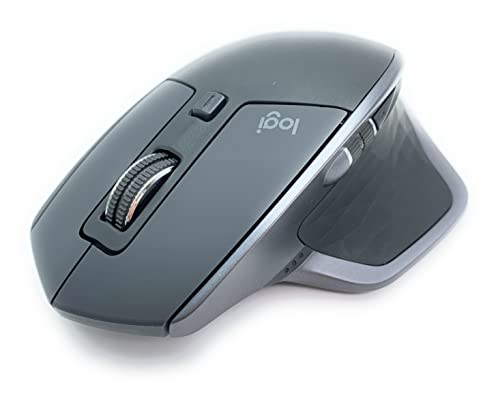
The Logitech MX Master 2S occupies a unique spot on this list. It was built specifically as a high-end productivity mouse, and it shows in every design choice. But its precision tracking, excellent ergonomics, and smart software make it just as capable for casual to moderate gaming. If office work is your primary focus and gaming is secondary, this is the most purpose-built option here.
Its most impressive trick for office use is multi-device connectivity. You can pair it with up to three computers simultaneously and switch between them with a single button press on the bottom of the mouse. There is virtually no lag when switching. For people who work across a laptop and a desktop, or who share a computer setup with a partner, this is a feature that almost no other mouse offers.
The hyper-fast scroll wheel is exceptional. It toggles between a smooth friction-based scroll for precise work and a free-spin mode that lets you fly through thousands of lines in a second. A side scroll wheel adds horizontal navigation, which is particularly useful in wide spreadsheets or for editing software. The mouse works on virtually any surface, including glass, which removes the need for a mousepad entirely.
Battery life is a genuine strength here. On a single charge, the MX Master 2S lasts up to 70 days depending on usage intensity. It charges via Micro-USB and can be used while charging, so downtime is never really an issue. Connectivity works over Bluetooth or via Logitech’s Unifying receiver, giving you flexibility based on your desk setup.
Key Specs:
- Sensor: Darkfield optical, tracks on virtually any surface
- Buttons: 7 programmable
- Connection: Bluetooth or Logitech Unifying receiver
- Battery life: Up to 70 days per charge
- Scroll: Hyper-fast main wheel plus side scroll wheel
- Multi-device: Connects to up to 3 devices
- Three-device switching is effortless and nearly instant
- Up to 70-day battery life removes charging anxiety entirely
- Hyper-fast scroll plus side wheel cover every navigation need in a busy workday
- Heavier than most gaming mice on this list, which some people find tiring over very long sessions
- Customizable shortcut button behavior can be inconsistent on Windows 11 in some setups
4. Razer DeathAdder V3 Pro: Feather-Light Wireless Built for Long Hours

The Razer DeathAdder V3 Pro does something that seems almost impossible when you first pick it up: it is a large, full-size ergonomic mouse that weighs only 63 grams. That is lighter than most compact mice on the market. The weight reduction, achieved through precision engineering rather than a honeycomb shell, means hours of use without the hand fatigue that heavier mice can cause.
This mouse runs on Razer’s Focus Pro 30K optical sensor, which offers flawless tracking across nearly any surface, including glass. Maximum sensitivity reaches 30,000 DPI, and the 99.8% resolution accuracy means every micro-adjustment you make translates precisely on screen. That kind of reliability matters when you are doing detailed work as much as when you are lining up a shot.
The ergonomic form was refined in partnership with professional esports athletes, and the result is a shape that supports medium to large hands exceptionally well. Your palm rests naturally on the hump, your fingers fall into place without strain, and the thumb position is comfortable without forcing contact with the side buttons. We found this mouse particularly well-suited to people who experience wrist or hand discomfort after long sessions at a desk.
Wireless performance uses Razer’s HyperSpeed technology, which runs 25% faster than standard wireless protocols. Connection is stable even in busy wireless environments. Battery life runs up to 90 hours of continuous use, and the mouse charges quickly via USB Type-C. Five programmable buttons cover the essentials without overcrowding the layout.
Key Specs:
- Sensor: Focus Pro 30K optical
- Buttons: 5 programmable (plus DPI button)
- Connection: Wireless 2.4GHz HyperSpeed or wired USB Type-C
- Weight: 63g
- Battery life: Up to 90 hours
- Switch rating: 90 million clicks, Gen-3 optical
- 63g ultra-lightweight design dramatically reduces hand and wrist fatigue over long use
- Focus Pro 30K sensor tracks with near-perfect accuracy even on glass
- 90-hour battery life with fast USB-C charging makes power management effortless
- Only 5 programmable buttons, which may feel limiting for heavy macro users
- Scroll wheel feedback is more basic compared to the other premium mice on this list
5. SteelSeries Rival 5: The Multi-Genre Workhorse With a Surprising Office Edge

The SteelSeries Rival 5 is built around versatility. With 9 programmable buttons including a unique 5-button quick-action side panel, it was designed for players who juggle multiple game genres. But that same multi-action layout translates surprisingly well to office use, where having five extra shortcuts on the thumb side of the mouse can genuinely cut down on keyboard reaching throughout the day.
The TrueMove Air sensor, co-developed with PixArt, offers true 1-to-1 tracking up to 18,000 CPI. There is no built-in acceleration or filtering, so what you move is exactly what registers on screen. The tracking feels natural and consistent whether you are working at low sensitivity across two monitors or snapping quickly in a fast-paced shooter.
At 85 grams, the Rival 5 sits in a comfortable middle ground: light enough to maneuver easily, but with enough substance that movements feel deliberate and controlled. The ergonomic right-handed shape suits claw and fingertip grip styles well, and the overall build feels durable and well-constructed for daily use.
One thing we particularly liked is the super mesh cable. It is soft, flexible, and creates very little drag on the mousepad. If you dislike the stiff cables that come with many wired mice, this one will feel noticeably different from the moment you start using it. The 10-zone PrismSync RGB lighting is fully customizable through SteelSeries GG software, which is one of the more polished customization programs available.
Key Specs:
- Sensor: TrueMove Air optical, up to 18,000 CPI
- Buttons: 9 programmable (includes 5-button side panel)
- Connection: Wired USB
- Weight: 85g
- Switch rating: 80 million clicks, IP54 dust and water resistant
- RGB zones: 10-zone PrismSync
- 5-button quick-action side panel is uniquely useful for both gaming macros and office shortcuts
- TrueMove Air sensor delivers consistent, accurate tracking without acceleration
- SteelSeries GG software makes profile customization straightforward and flexible
- Wired only with no wireless option available
- Middle mouse button requires noticeably more force to click compared to the other buttons
Best Gaming Mice for Office Work: A Quick Rundown
- Logitech G502 Hero: Best overall for customization, with an adjustable weight system and 11 programmable buttons
- Razer Basilisk V3: Best scroll wheel experience, with a premium HyperScroll Tilt Wheel and zero-misfiring optical switches
- Logitech MX Master 2S: Best for multi-device productivity, with seamless three-computer switching and up to 70-day battery life
- Razer DeathAdder V3 Pro: Best for comfort and portability, with a 63g wireless design built to reduce wrist fatigue
- SteelSeries Rival 5: Best value multi-button layout, with a unique five-button side panel and one of the most flexible sensor configurations on this list
Final Thoughts
Picking the right mouse for a dual gaming and office role comes down to what you value most in each context. If you spend most of your time doing detailed work across multiple screens and computers, a wireless mouse with strong productivity features and multi-device support will serve you better. If performance in both gaming and long work sessions carries equal weight, an ergonomic design with a high-quality sensor and programmable buttons is the smarter call.
Think about how long you actually sit at your desk each day, what kind of grip style feels most natural to you, and whether wireless freedom or a wired connection matters to your setup. The right mouse is the one that feels like it disappears into your workflow. Find that one, and you will notice the difference every single day.