Fingertip grip is one of the most demanding ways to use a mouse. Your fingers do all the work, your palm never touches the back, and every ounce of unnecessary weight slows you down. If you’ve tried gaming with a standard mouse using this style, you already know how quickly a heavy or awkwardly shaped mouse can ruin your aim and tire out your hand.
Finding the right match takes more than picking the lightest thing on the shelf. Shape, sensor quality, button placement, and how the mouse feels when you’re lifting and repositioning it constantly all matter. A mouse that works great for palm grip can feel completely wrong in a fingertip hold.
We tested and researched the top options available right now to bring you a shortlist worth your time. Each pick here was chosen specifically with fingertip grip in mind, so you can stop guessing and start gaming with more confidence.
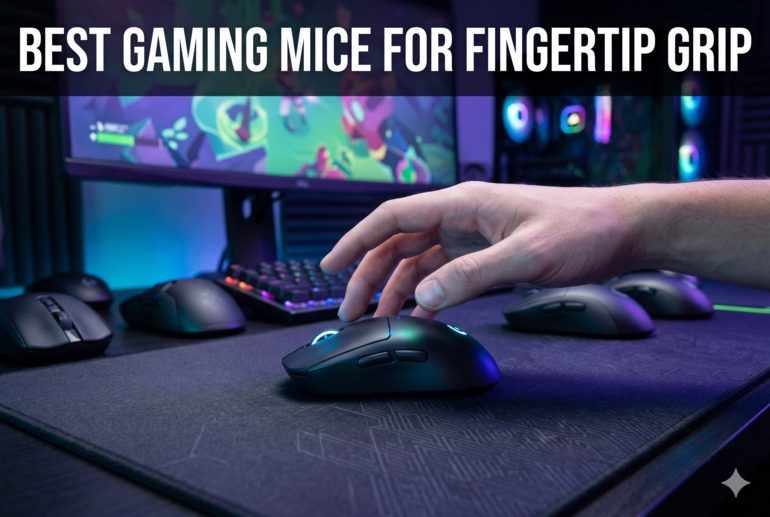
How We Selected the Best Gaming Mice for Fingertip Grip
Our team spent time evaluating dozens of gaming mice across different price points, focusing on how each one performs for fingertip grip users specifically. We compared sensor accuracy, weight distribution, button accessibility, and real-world performance to narrow the field down to five strong options worth recommending.
Here are the factors we considered:
- Weight: Light mice reduce fatigue and allow faster repositioning, which is critical for fingertip grip users who lift and flick constantly.
- Shape and size: Compact, low-profile shells that don’t require a palm rest work best for fingertip grip, so we paid close attention to dimensions and curves.
- Sensor performance: Accurate, consistent tracking without spinouts or jitter is non-negotiable at any DPI setting.
- Button accessibility: Side buttons and the DPI toggle need to be reachable without shifting your grip, especially with only fingertips in contact.
- Connectivity and reliability: Whether wired or wireless, the mouse needs a stable connection that doesn’t introduce lag or random disconnects during play.
- Cable quality (for wired options): A stiff or heavy cable creates drag that undermines the whole point of a light mouse, so cable flexibility matters.
- Battery life (for wireless options): Wireless mice need enough battery endurance to get through long sessions without interrupting gameplay.
Every product on this list passed our evaluation across most of these criteria. You can trust that these picks reflect genuine research, not guesswork.
Best Gaming Mice for Fingertip Grip (2026 Expert Review)
Five strong picks, from ultra-portable wireless options to budget-friendly wired performers. Whether you’re a competitive FPS player, an RTS gamer, or someone who just wants a light, accurate mouse that won’t tire your hand, there’s something here for you.
1. Razer Orochi V2 — The Compact Wireless Pick for Fingertip Grip on the Go
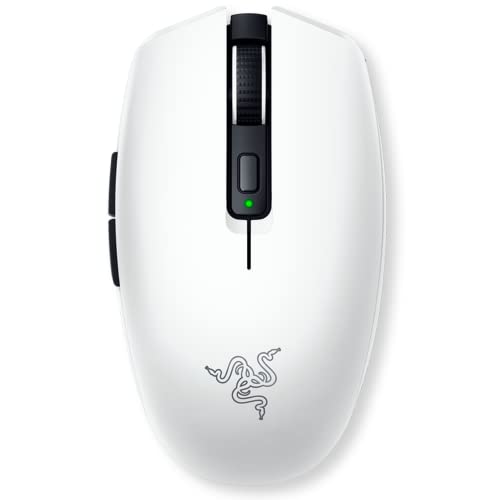
The Razer Orochi V2 is built around one idea: do more with less. At just 60g excluding the battery, it’s one of the lightest wireless gaming mice available, and its compact form factor makes it a natural fit for fingertip grip users who want full control without the bulk. The dual wireless modes, Bluetooth for general use and Razer HyperSpeed at 2.4GHz for competitive gaming, give it real versatility.
What sets this mouse apart from other compact options is the shape. The sides have subtle grooves rather than flat symmetrical walls, which means your fingers actually have something to grip when you’re lifting and repositioning. We found that even users with larger hands can hold this mouse comfortably using a fingertip style, which is not always the case with smaller mice.
The Razer 5G Advanced 18K DPI optical sensor tracks with strong precision and shows no spinouts during fast swipes. The second-generation mechanical switches deliver crisp, tactile clicks rated for up to 60 million presses, and the gold-plated contact points add long-term durability to the equation. This is not a mouse that feels fragile despite its light construction.
Battery life is genuinely exceptional. Up to 950 hours on Bluetooth and 425 hours via HyperSpeed means you’re swapping batteries maybe once every few months, not every week. The hybrid AA/AAA battery slot also lets you tune the weight slightly depending on which battery size you prefer, which is a thoughtful touch for players who care about every gram.
Key Specs:
- Weight: 60g (excluding battery)
- Sensor: Razer 5G Advanced 18K DPI Optical
- Connectivity: Bluetooth + 2.4GHz HyperSpeed Wireless
- Switches: 2nd-Gen Razer Mechanical (60M click lifecycle)
- Battery life: Up to 950 hours (Bluetooth) / 425 hours (HyperSpeed)
- Buttons: 6 programmable
- Exceptional battery life for a wireless mouse
- Compact shape with grip grooves that actually work for fingertip hold
- Dual wireless modes add flexibility for both gaming and productivity
- Runs on replaceable batteries rather than a built-in rechargeable cell
- Compact size may feel cramped for users with larger hands in some grip styles
2. Razer DeathAdder V3 Wired — The Precision Workhorse Built for Competitive Play

The Razer DeathAdder V3 is the product of years of refinement, developed in collaboration with professional esports players who needed a mouse that could keep up with the fastest gameplay. At 59g, it’s one of the lightest ergonomic gaming mice available, and the redesigned shape carries on the DeathAdder legacy without any of the unnecessary bulk that slowed down earlier versions.
The Focus Pro 30K optical sensor is one of the best in its class. It tracks accurately on a wide range of surfaces, including glass, and maintains 99.8% resolution accuracy during fast movements. For fingertip grip users who make rapid micro-adjustments, that level of consistency makes a real difference in competitive scenarios.
Where this mouse earns serious attention is its polling rate. The 8K Hz HyperPolling technology reports the mouse’s position to your PC up to 8,000 times per second, which translates to near-zero input latency. Combine that with Gen-3 optical switches rated for 90 million clicks and zero double-click issues, and you have a mouse built to handle the most demanding play sessions without skipping a beat.
The Speedflex cable deserves a mention on its own. It’s woven for greater flexibility and produces almost no drag during swipes, which is genuinely important for fingertip grip where you’re lifting and flicking frequently. We found it behaves more like a wireless mouse in terms of cable resistance than a typical wired product.
Key Specs:
- Weight: 59g
- Sensor: Focus Pro 30K Optical
- Connectivity: Wired USB (8K Hz HyperPolling)
- Switches: Optical Switches Gen-3 (90M click lifecycle)
- Buttons: 6 programmable
- Cable: Razer Speedflex
- 8K Hz HyperPolling for near-zero latency
- Optical Gen-3 switches with zero double-click issues
- Speedflex cable minimizes drag during fast swipes
- Wired only, no wireless option in this version
- Ergonomic right-handed shape may not suit all fingertip grip styles equally
3. Razer Viper V3 HyperSpeed — The Wireless Esports Mouse That Lasts All Season

The Razer Viper V3 HyperSpeed was shaped with input from esports professionals who specifically use claw and fingertip grip styles, and that focus shows in every curve of the design. The symmetrical shell sits lower and flatter than traditional ergonomic mice, which keeps your fingertips in natural contact with the buttons and sides without forcing an awkward angle. At 82g with battery included, it’s heavier than some of the competition, but the mass-centralized design keeps it feeling balanced in hand.
The Focus Pro 30K optical sensor from Razer’s flagship lineup appears here in a mid-range package, which is genuinely impressive. You get 99.8% resolution accuracy, glass surface tracking, and intelligent functions that maintain precision during fast flicks. This is the same sensor found in much more expensive mice, and pairing it with HyperSpeed Wireless means you’re getting flagship tracking without a wire and without spending flagship money.
Battery life is where this mouse really pulls ahead of the wireless competition. Up to 280 hours on a single AA battery means most players will go weeks between swaps, even with extended daily sessions. The DPI button sits on top of the mouse and is recessed enough that you won’t accidentally trigger it mid-game, and the five customizable DPI stages can be adjusted via Razer Synapse.
We found the side buttons to be more separated than on previous Viper models, with a slight gap between them that makes individual presses easier to identify by feel. The Gen-2 mechanical switches produce crisp, audible clicks that feel confident under fast fingertip taps, which matters when you’re threading precise shots in competitive FPS titles.
Key Specs:
- Weight: 82g (including AA battery)
- Sensor: Focus Pro 30K Optical
- Connectivity: 2.4GHz HyperSpeed Wireless
- Switches: Mechanical Switches Gen-2 (60M click lifecycle)
- Battery life: Up to 280 hours
- Buttons: 8 programmable
- Up to 280 hours of battery life on one AA battery
- Flagship Focus Pro 30K sensor at a mid-range price
- Shape specifically optimized for claw and fingertip grip
- Runs on a replaceable AA battery with no built-in recharging
- Heavier than some competing fingertip-grip mice at 82g with battery
4. SteelSeries Aerox 3 Wireless — The Water-Resistant Lightweight With Dual Wireless

The SteelSeries Aerox 3 Wireless earns its spot on this list by combining a 66g build with IP54 water and dust resistance, which is a combination you don’t see often at this weight class. The AquaBarrier protection means spills and dusty environments won’t end your mouse’s life prematurely, and the overall construction feels more durable than the weight suggests. The ergonomic right-handed shell is compact with indented sides that give your thumb and ring finger natural contact points during fingertip hold.
Connectivity is handled by SteelSeries’ Quantum 2.0 Wireless system at 2.4GHz for gaming, with Bluetooth 5.0 available for casual use on a laptop or tablet. Switching between the two is straightforward, and having the USB-C dongle means you’re using a standard port rather than a proprietary connector. USB-C also handles fast charging, so you can top up quickly between sessions.
The TrueMove Air optical sensor, developed with PixArt specifically for wireless gaming, tracks at up to 18,000 CPI with a 400 IPS max speed and 40G acceleration. It’s a capable sensor that handles most surfaces reliably, and we found tracking to be smooth and predictable during fast movements. The 100% PTFE mouse feet glide cleanly across cloth and hard pads alike.
Battery life is rated at 200 hours of continuous use, and the mouse charges quickly via its included USB-C cable. The three-zone RGB lighting adds visual flair without adding meaningful weight, and SteelSeries GG software lets you customize lighting profiles, DPI stages, and button assignments per application.
Key Specs:
- Weight: 66g
- Sensor: TrueMove Air Optical (18,000 CPI)
- Connectivity: 2.4GHz Wireless + Bluetooth 5.0
- Switches: IP54 Mechanical (80M click lifecycle)
- Battery life: Up to 200 hours
- Buttons: 6
- IP54 water and dust resistance at a competitive weight
- Dual wireless via 2.4GHz and Bluetooth 5.0
- PTFE mouse feet for smooth, consistent glide
- Some reports of occasional wireless disconnection
- Side buttons sit slightly recessed and can be harder to activate quickly
5. Cooler Master MM710 — The Sub-53g Budget Pick That Doesn’t Apologize for Anything

At under 53g and built on a honeycomb shell that removes every gram of unnecessary material, the Cooler Master MM710 is as close to a no-weight gaming mouse as you can get at this price point. It runs the PixArt PMW 3389 sensor, which tracks at up to 16,000 DPI with 400 IPS speed and genuine accuracy. This is a sensor used in mice that cost significantly more, and getting it here for well under $30 is hard to argue with.
The Ultraweave cable is one of the standout physical features. It’s significantly lighter and more flexible than a standard braided cable, and the result is that the MM710 feels almost wireless when you’re swiping across a pad. For fingertip grip users who flick and lift constantly, that cable behavior removes a frustration that ruins otherwise good wired mice. The PTFE feet add to the effortless glide.
The ambidextrous shape is compact at 4.6 inches long, with a slightly raised hump and tapered front that suits fingertip grip well. We found that the shape gives your ring finger and pinky a natural edge to grip without the mouse feeling unstable. OMRON switches handle the primary clicks, and they deliver a tactile, snappy response that rewards precise, quick presses.
Key Specs:
- Weight: Under 53g
- Sensor: PixArt PMW 3389 (16,000 DPI)
- Connectivity: Wired USB (1000Hz polling)
- Switches: OMRON
- Grip styles: Palm, claw, fingertip
- Buttons: 5
- Under 53g with a honeycomb shell that’s genuinely durable
- PixArt PMW 3389 sensor offers accuracy well above its price class
- Ultraweave cable dramatically reduces drag during fast swipes
- Software setup can be unreliable with occasional update and profile-saving issues
- Wired only with no wireless option
Best Gaming Mice for Fingertip Grip: A Quick Rundown
- Razer Orochi V2 — Best for portable wireless gaming with exceptional battery life
- Razer DeathAdder V3 — Best for competitive wired play with 8K Hz polling and optical switches
- Razer Viper V3 HyperSpeed — Best wireless option for esports-focused fingertip and claw grip players
- SteelSeries Aerox 3 Wireless — Best for water resistance and dual wireless flexibility
- Cooler Master MM710 — Best budget pick with a premium sensor and featherlight build
Final Thoughts
Fingertip grip demands a specific kind of mouse: light enough to move without effort, compact enough to control with just your fingertips, and accurate enough to reward precision. The five options here cover different budgets and use cases, but all of them pass the basic test of being genuinely usable for this grip style without compromise.
Your best pick depends on what you value most. If battery life and portability matter most, go wireless. If you want the absolute lowest latency and zero cable frustration, a well-designed wired option is still hard to beat. And if your budget is tight, a lighter-than-expected sensor-packed mouse can punch well above its cost. Take stock of what frustrates you about your current setup and match that against the strengths here. The right mouse won’t just feel comfortable; it’ll make you wonder how you tolerated anything heavier.